EN
EN  ES
ES  IT
IT  FR
FR 
Think of writing a resume as two distinct but connected tasks: choosing the right format to frame your professional story and then customizing the content for the specific job you’re after. A truly effective resume isn't just a laundry list of your past jobs; it's a sharp, focused marketing tool designed for one purpose—to land you an interview.
Building Your Resume's Foundation

Before a single word hits the page, you need a game plan. You wouldn't build a house without a blueprint, and the same principle applies here. A winning resume starts with understanding who you're writing for—the recruiter and their applicant tracking software—and then picking the right structure to show them what you've got. Getting this foundation right makes the actual writing so much easier and more impactful.
Your first big decision is the format. This choice dictates how you present your career story, allowing you to highlight your biggest strengths and strategically downplay things like employment gaps or a recent career pivot.
Choose Your Resume Format
You’ve got three main options, and the best one for you really depends on your career path and what you’re trying to achieve next. Let's look at the pros and cons of each.
| Format Type | Best For | Key Characteristic |
|---|---|---|
| Chronological | Professionals with a consistent career history in a single field. | Lists your jobs from most recent to oldest. This is the classic format, and the one recruiters know and love. |
| Functional | People changing careers, new graduates, or anyone with significant gaps in their work history. | Focuses on your skills, not your timeline. You'll group experiences under headings like "Leadership" or "Project Management." |
| Combination | Seasoned pros with a broad skill set that's directly relevant to the new role. | It’s a hybrid. You lead with a strong skills section, then follow it up with a more compact work history. |
Honestly, for over 90% of people, the reverse-chronological format is the way to go. It’s what hiring managers expect, and it does the best job of showing your career growth. Unless you have a very specific reason not to, stick with this one.
Expert Tip: This isn't the place to get overly creative with graphic design. While a unique layout might look cool to you, most companies use Applicant Tracking Systems (ATS), and these bots get confused by fancy tables, columns, and images. A clean, single-column format is always your safest bet.
Dissect the Job Description
With your format selected, it's time to put on your detective hat. That job description is more than just a list of duties—it’s a cheat sheet telling you exactly what the company is looking for. This is where you'll find the keywords you need to sail past the ATS and catch a human's eye.
I always recommend printing out the job description or pulling it into a separate document. Then, get out a highlighter and start marking it up. You're looking for:
- Hard & Soft Skills: Pull out all the technical skills (like "Salesforce" or "Python") and people skills ("team collaboration," "strong communication").
- Key Responsibilities: Pay attention to the action verbs they use. Are they looking for someone to "optimize," "develop," "manage," or "analyze"?
- Company Culture Cues: Look for words that describe their environment. Phrases like "fast-paced," "data-driven," or "highly collaborative" give you clues about the language you should echo in your own resume.
When you do this, you’re not just learning how to write a generic resume; you're learning how to write the resume for this job. This targeted approach is what separates the resumes that get interviews from the ones that get ignored.
Crafting Each Resume Section for Impact
Alright, you’ve got your strategy down. Now it's time to actually build the resume, piece by piece. Think of yourself as an architect, and each section is a critical part of the structure. Every single one has a job to do—from making sure they can actually call you to hooking them with your biggest career wins.
We’ll walk through the non-negotiable sections: your contact info, professional summary, experience, education, and skills. The goal here isn't just to fill the page; it’s to make every word work for you.
Get Your Contact Information Right
This sounds like a no-brainer, but you'd be surprised how many people get it wrong, instantly killing their chances. Your contact information has to be professional, 100% accurate, and easy to find right at the top of the page.
Here’s exactly what to include:
- Your Full Name: Make this the most prominent text on the document. Use a slightly larger, bold font.
- A Professional Email: Stick to a clean format like
FirstName.LastName@email.com. Thatsk8rboi1999@...email address has to go. - Phone Number: Give them the number you actually answer.
- Location (City, State): Your full street address isn't necessary anymore.
- LinkedIn Profile URL: A polished LinkedIn profile is your resume’s best friend. Make sure you’ve customized the URL so it looks clean, not like a random string of numbers.
Human-Like Tip: Clarity and professionalism are everything here. I can't stress this enough: triple-check for typos. A single wrong digit in your phone number means that interview call will never come.
Write a Powerful Professional Summary
Forget the old-school "Objective Statement." Today's resumes need a powerful Professional Summary to grab a recruiter's attention from the get-go. This is your 3-4 sentence elevator pitch, sitting right under your contact details. Its only purpose is to summarize your value and make them want to keep reading.
Let's be real: you have seconds, not minutes, to make an impression. Most hiring managers spend a mere 6 to 8 seconds on their first scan. This tiny paragraph is your best shot. In fact, 70% of effective resumes lead with a summary, while only 37% still use an objective. Given that 77% of recruiters consider grammar mistakes a deal-breaker, this short blurb has to be perfect.
A killer summary hits three key points:
- Who you are: Your professional title and years of experience (e.g., "Data Analyst with 5+ years of experience…").
- What you do: Name 2-3 of your top skills that match the job description (e.g., "…specializing in data visualization and predictive modeling…").
- Your biggest win: Drop a quantifiable achievement that proves you deliver results (e.g., "…who developed a new reporting dashboard that cut data processing time by 30%.").
Key Takeaway: Your summary isn't about what you're looking for. It's about what you can do for them. Frame your experience as the solution to their company's problems.
Frame Your Experience with Achievements
The work experience section is the engine of your resume. This is where you prove you can do the job by showing you’ve already done it—and done it well. But just listing your old job duties is a recipe for being ignored. You have to reframe those responsibilities as compelling, active accomplishments.
For each job, list your title, the company, its location, and the dates you worked there. Then, under each role, use 3-5 bullet points to showcase what you actually achieved.
The magic formula I always recommend is the CAR method (Challenge, Action, Result). For every bullet point, think about a problem you faced, the specific action you took, and the measurable result you delivered.
Just look at the difference this makes for a Marketing Manager role:
| Before (Responsibility-Focused) | After (Achievement-Focused) |
|---|---|
| • Managed social media accounts. | • Grew organic social media following by 45% in six months by launching a targeted content series. |
| • Responsible for email campaigns. | • Increased email open rates by 22% and click-through rates by 15% by implementing A/B testing for subject lines. |
| • Created weekly reports. | • Developed a new analytics dashboard that provided real-time campaign insights, saving the team 5 hours per week. |
The "after" examples pop. They use strong verbs and hard numbers to show real impact. This is also the perfect place to weave in those keywords from the job description. That's what true resume tailoring is all about.
Detail Your Education and Skills
Your Education and Skills sections wrap things up. The key here is to be concise and relevant.
Education:
- List your most recent degree first.
- Include the degree (e.g., Bachelor of Science in Computer Science), the university, and your graduation year.
- My advice? Leave off your GPA unless you're a recent grad and it's a 3.5 or higher.
Skills:
- Don't just throw a list of words on the page. Organize your skills with subheadings like "Technical Skills," "Software," or "Languages."
- This simple trick makes it incredibly easy for a recruiter to scan and find exactly what they’re looking for.
- Always prioritize the skills you saw mentioned in the job posting to prove you’re a great fit.
Example of a well-organized skills section:
Technical Skills: SQL, Python (Pandas, NumPy), Tableau, Power BI
Languages: English (Native), Spanish (Conversational)
Finally, don’t forget about optional sections. Adding Projects, Certifications, or even Volunteer Experience can be a game-changer, especially if they’re relevant to the job. These are fantastic for filling employment gaps or proving your passion for the field when switching careers.
Optimizing Your Resume for Recruiters and Robots
It’s a hard truth, but your carefully written resume isn't just for human eyes anymore. Before a hiring manager ever sees it, your application has to get past the gatekeeper: an Applicant Tracking System (ATS). These software programs scan and rank resumes, and honestly, they’re not very sophisticated. In fact, over 70% of resumes get filtered out by an ATS before a person even has a chance to read them.
You have to write for two very different audiences. First, the robot, which needs clear formatting and specific keywords. Then, the human, who wants to see your story and your impact. It’s a bit of a balancing act, but one you can definitely master. You just have to know the rules of the game.
So, where should you put your effort? The data points to one clear winner: your achievements.
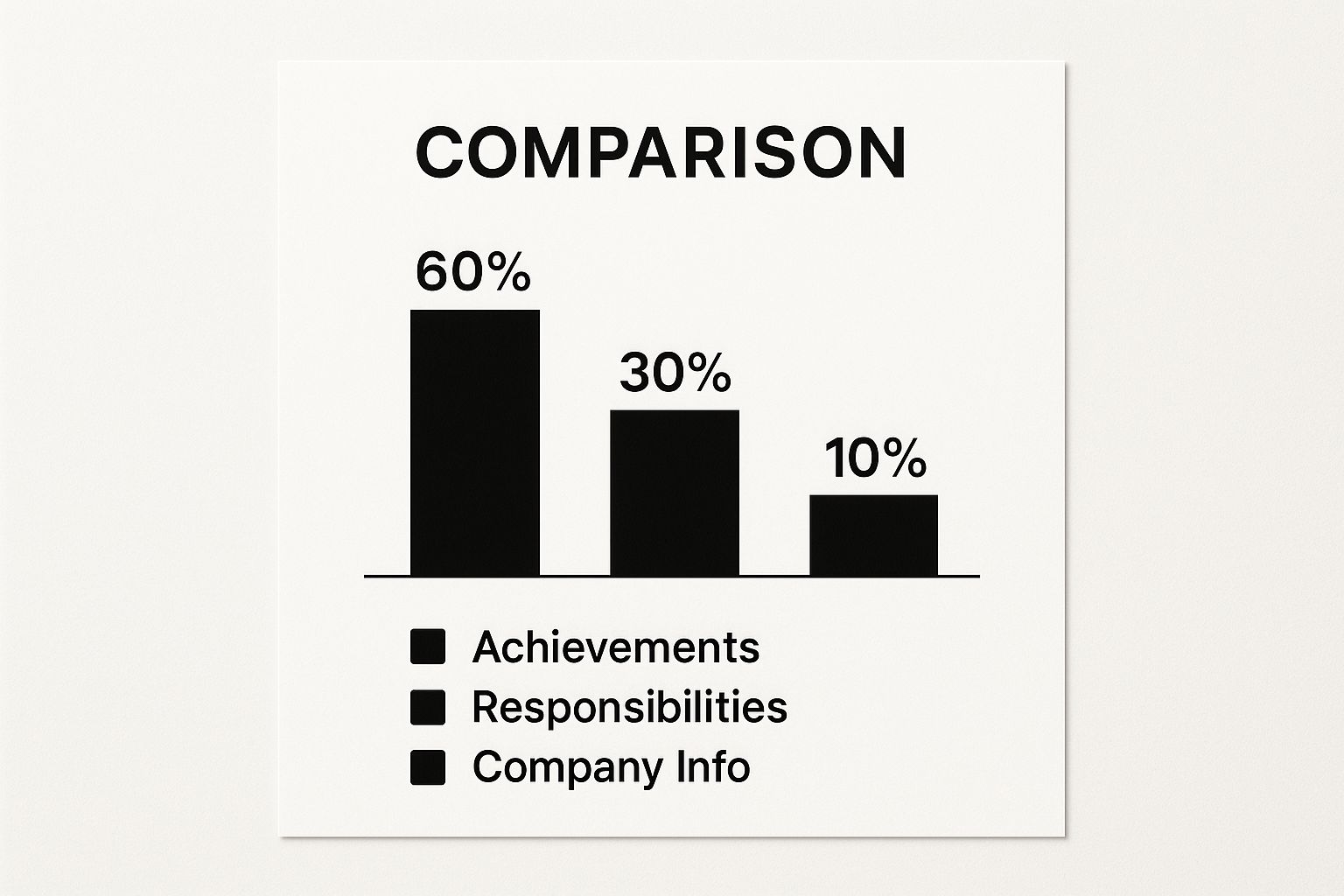
A resume that’s 60% achievements, 30% responsibilities, and 10% company context speaks volumes to both the software scanning for results and the recruiter looking for a high-performer.
Speaking the Language of the ATS
Applicant Tracking Systems are essentially keyword-matching machines. They scan your resume for words and phrases that align with the job description. If your resume is missing those key terms, the ATS scores you low, and your application gets tossed into a digital black hole. It’s that simple.
Your mission is to find the most important keywords from the job posting and weave them naturally into your resume. Don't just stuff them in; that looks obvious and clunky. Instead, integrate them thoughtfully into your professional summary, experience bullet points, and skills section.
For instance, if a job description repeatedly mentions "agile methodology" and "JIRA," you need those exact phrases in your resume. Make sure they appear in your skills list and, even better, within a bullet point describing a project where you used them.
Key Insight: Don't get creative with synonyms. The ATS is literal. If the company is looking for a "Project Manager," but you call yourself a "Project Lead," the system might not make the connection. Mirror the exact language from the job description whenever it accurately describes your skills and experience.
Common ATS Formatting Traps to Avoid
Even a perfectly keyword-optimized resume can fail if the ATS can't read it. These systems are easily confused by complex designs. The very things that might look stylish to a human can be a complete disaster for the software.
Watch out for these common formatting mistakes that trip up an ATS:
- Fancy Layouts: Columns, tables, and text boxes are the enemy of most ATS parsers. Stick with a clean, simple, single-column format. It’s always your safest bet.
- Headers and Footers: This is a big one. Information you place in a document's header or footer—like your name and contact info—can be completely ignored by the software. Always keep critical text within the main body of the document.
- Obscure Fonts: That cool, custom font might look great on your screen, but if the recruiter’s system doesn’t have it, your resume will turn into a jumbled mess. Stick to standard, web-safe fonts like Arial, Calibri, or Helvetica.
- Images and Graphics: Logos, photos, and those little skill-rating bars are completely invisible to an ATS. They add zero value for the initial scan and can actually confuse the parsing software.
The goal here isn't to be boring; it's to be readable. A clean document ensures the system can pull your information accurately and pass it along to the next stage.
To make this crystal clear, here’s a breakdown of what works and what doesn't.
ATS-Friendly vs. High-Design Resume Features
This table highlights the practical differences between a resume built for software and one built just for looks. When in doubt, always lean toward the ATS-friendly option, especially when applying online.
| Feature | ATS-Friendly Approach (Recommended) | High-Design Approach (Use with Caution) |
|---|---|---|
| File Type | .docx or .pdf (check instructions) | .pdf with complex layers, .jpg, .png |
| Layout | Single, linear column | Multi-column layouts, text boxes |
| Graphics | No images, logos, or icons | Headshot, skill bars, company logos |
| Fonts | Standard (Arial, Calibri, Helvetica) | Script, display, or custom fonts |
Ultimately, creating an ATS-friendly resume doesn't mean it has to be ugly. You can still use bold text, clear headings, and plenty of white space to guide the reader’s eye. It’s all about making smart, strategic choices that cater to both your robot and human audience.
Should You Hire a Professional Resume Writer?
You’ve tweaked every bullet point, optimized for every keyword, and formatted until your eyes crossed. But even after all that work, you might still be staring at your resume, wondering, "Is this really good enough?" It’s a common feeling, and it’s often when the idea of hiring a professional writer starts to sound pretty appealing.
So, is it worth the investment? The truth is, it depends. Handing your resume over to an expert can be a brilliant move for some, but for others, it’s money that could be better spent elsewhere. Let's dig into when it makes sense and when you’re probably better off going it alone.
When a Professional Can Be a Game-Changer
Hiring a pro can be a smart play in a few specific situations. If you find yourself nodding along to any of these, the cost could easily pay for itself.
- You're changing careers. Jumping from one industry to another is a huge challenge. A great writer knows how to reframe your past experience, translating your skills into the language of your new target field. They spot the transferable skills you might not even realize you have.
- You're aiming for the C-Suite. At the executive level, the stakes are sky-high. An executive resume specialist understands how to position strategic leadership and high-impact accomplishments to command a top-tier salary.
- Writing just isn't your strong suit. Let’s be honest—not everyone is a natural wordsmith. If you struggle to sell yourself on paper, a professional can craft a compelling narrative that highlights your value in a way you can't.
It’s no surprise that more people are seeking this kind of help. The global resume writing service market was valued at $2.31 billion in 2024 and is projected to soar to $3.42 billion by 2029. This boom is a direct response to a hyper-competitive job market where a perfectly polished resume is non-negotiable. You can see the full breakdown in this detailed industry report.
Expert Insight: A good resume writer is more than just a writer; they're a career strategist. They’ll ask the tough questions that dig deep, helping you uncover your best achievements and tell a powerful professional story.
Potential Downsides and How to Avoid Them
Of course, the industry has its share of duds. The last thing you want is to pay good money for a generic, cookie-cutter document that sounds like a stranger wrote it.
Common Risks and Red Flags
| Risk | Red Flag to Watch For |
|---|---|
| Generic Templates | The writer promises an unbelievably fast turnaround or a rock-bottom price. That’s a classic sign they're just plugging your info into a template. |
| Lack of Industry Knowledge | Their portfolio is all over the place, with no clear expertise in your field (like tech, healthcare, or finance). |
| Poor Communication | The entire process is based on a questionnaire with no real conversation. A quality service requires a genuine consultation call. |
Vetting a potential writer is crucial—treat it like you’re interviewing them for a job. A killer resume gets your foot in the door, but it's only the first step. You still have to nail the interview, which demands a deep understanding of your own story. To make sure you’re ready for what comes next, check out our guide on effective interview preparation.
A Checklist for Vetting a Resume Writer
Before you put any money down, run through these questions. This will help you make sure you’re working with a true professional.
- Can I see some work samples? Ask for before-and-after examples, ideally from your industry and for someone at your career level.
- What does your process look like? A solid process should always include a detailed consultation, a chance to review a draft, and at least one round of revisions.
- Do you know my industry? You need someone who understands the lingo, the key roles, and the keywords that hiring managers are looking for.
- Are you certified? Credentials like Certified Professional Resume Writer (CPRW) are a good sign of commitment and expertise.
- How will we work together? Make sure you'll have a direct line to your writer, not just a generic customer service email.
Final Review: Polishing Your Resume and Avoiding Common Pitfalls

You've built the structure, packed it with powerful content, and optimized it for the hiring bots. You're at the finish line, but this is the lap where so many job seekers stumble. A single, overlooked typo or a glaring formatting mistake can derail all your hard work. This final review isn't just a quick spell-check; it's about polishing your resume until it shines, giving you the confidence to finally hit "submit."
It helps to keep the role of the resume in perspective. Think of it as your ticket to the concert—it gets you through the door, but it doesn't guarantee a front-row seat. As the job market grows more competitive, it's easy to get lost in the noise. Internal hiring data often shows that resumes act as an initial filter, with skills tests and interviews carrying far more weight in the end. So, view your polished resume as one critical piece of a much larger job search strategy.
The Multi-Pass Proofreading Method
Just scanning for spelling errors isn't going to cut it. Our brains are wired to see what we expect to be there, not what's actually on the page. To catch every little mistake, you need a deliberate system.
- Read It Aloud: This simple trick forces you to slow down. You'll be surprised how many awkward phrases and grammatical errors you catch when you actually hear them spoken.
- Read It Backward: This is a classic for a reason. Start with the very last word of your resume and read your way to the top. It breaks the natural flow of the sentences, helping you focus on each individual word and spot typos you’d otherwise miss.
- Get a Fresh Pair of Eyes: After staring at the same document for hours, you develop "resume blindness." Ask a trusted friend, a former colleague, or a mentor to look it over for clarity, grammar, and overall impact. A fresh perspective is invaluable.
What to Leave Off Your Resume
Knowing what to cut is just as important as knowing what to include. A cluttered resume only distracts the reader from your most impressive qualifications.
Here’s a quick list of things to chop:
- Objective Statements: These are outdated. Replace them with a powerful and modern professional summary that highlights your value.
- Irrelevant Hobbies: Unless your passion for rock climbing directly demonstrates teamwork and perseverance relevant to the job, it's best to leave it off.
- An Unprofessional Email: That email address you made in high school? It's time for it to retire. Stick to a simple
FirstName.LastName@email.com. - Overused Buzzwords: Ditch the clichés like "team player," "results-driven," and "go-getter." Instead, use your bullet points to show these qualities through concrete achievements.
For a deeper dive into what makes a resume truly stand out, you can explore our full library of resume resources and articles.
Key Takeaway: Every single word on your resume needs to earn its place. If a piece of information doesn't directly support your case for this specific role, it's just noise.
The One-Page vs. Two-Page Debate
So, how long should your resume actually be? This isn't a one-size-fits-all answer; it depends entirely on your level of experience. While there's no single "right" length, there are some very clear guidelines that hiring managers expect you to follow.
| Experience Level | Recommended Length | Rationale |
|---|---|---|
| Students & Recent Grads | One Page | You likely don't have enough relevant experience to fill more. Keep it tight and focus on internships, key projects, and skills. |
| 0-10 Years of Experience | One Page | Be concise. A recruiter should grasp your value proposition in seconds. Focus only on your most impactful roles and achievements. |
| 10+ Years of Experience | Two Pages | You've earned the extra space. This is perfectly appropriate for senior-level professionals, executives, or academics. |
Always remember, a recruiter will only bother reading a second page if the first one was absolutely compelling. Never add a second page just to fill space with fluff. Make sure every bullet point—especially those on page two—adds significant, undeniable value.
Answering Your Lingering Resume Questions
Even with the best guide in hand, you’re bound to have a few nagging questions as you put the finishing touches on your resume. That’s perfectly normal. Let's tackle some of the most common ones I hear from job seekers.
What’s the Best Way to Handle Employment Gaps?
First, don't panic. And definitely don't try to hide an employment gap by stretching your dates—that’s a red flag for any recruiter and a surefire way to get disqualified. The key is to be honest and strategic.
You’ve got a few solid options for addressing it on paper:
- Rethink your format. If you have a longer gap, a combination resume is your friend. It lets you showcase your skills and qualifications upfront, making the chronological work history less of a focal point.
- Fill the gap productively. Were you taking courses, earning a certification, or doing meaningful volunteer work? Absolutely add it! A "Professional Development" or "Community Involvement" section can turn a potential negative into a real positive.
- Frame it with confidence. You can briefly address the reason for the gap. A simple, positive explanation like "Planned career break for family needs" or "Took one year for independent travel and study" works perfectly.
Should I Put "References Available Upon Request" on My Resume?
The short answer is no. This phrase is a leftover from a bygone era. It's assumed that you'll provide references if a company is serious about hiring you, so adding that line just wastes precious space.
My Advice: Keep your references on a completely separate document. Make sure it's polished and ready to go, with updated contact information for everyone. When a recruiter asks for it, you can send it over immediately.
PDF or Word Doc? Which File Format Is Best?
This one is pretty straightforward. PDF (.pdf) is the gold standard for resumes. It locks in your formatting, so what you see is exactly what the hiring manager sees, no matter what computer or software they use.
The only exception? Pay close attention to the job application's instructions. If an employer’s system specifically asks for a Word document (.docx), you should absolutely upload a .docx file. Some older Applicant Tracking Systems (ATS) prefer it. But if they don’t specify, PDF is always the safer and more professional choice.
Here’s a quick breakdown:
| File Type | Why You'd Use It | The Downside |
|---|---|---|
| PDF (.pdf) | Professional look, universal compatibility, keeps your formatting intact. | A few very old ATS might have trouble reading it. |
| Word (.docx) | Easy for anyone to edit, and some old systems still request it. | Your formatting can get completely messed up on different devices. |
In my experience, a PDF is the right call over 95% of the time.
Feeling good about your resume is the first real step toward landing that next great job. To give yourself a serious advantage, let JobWinner help you cross the finish line. Our AI-powered tools can instantly optimize your resume for any role, write a compelling cover letter, and even prep you for your interview. You'll be able to apply with total confidence, every single time. Discover how JobWinner can transform your job search.
Article created using Outrank