ES
ES  EN
EN  IT
IT  FR
FR 
A lot of university teams are in the same spot right now. Students can browse jobs in one system, book advising in another, store resumes in a shared drive, and get labor market insights from a separate dashboard. Staff then stitch the whole experience together with spreadsheets, email reminders, and manual reporting.
That setup worked when career services was treated as a support office. It doesn't work when boards, presidents, provosts, and families all want clearer evidence that students are moving from education to employment.
A modern career platform saas for universities isn't just a nicer job board. It's a connected operating layer for career exploration, employer engagement, advising, outcomes reporting, and, increasingly, job application execution. That last part matters more than most committees realize. Many platforms help students discover opportunities. Fewer help them apply well.
Why Every University Needs a Modern Career Strategy
A familiar scene plays out on many campuses. A career services director opens five browser tabs before 9 a.m. One tab holds appointments. One holds employer postings. One stores event data. One contains first-destination reporting. One is a spreadsheet the office trusts more than any system because it's the only place everything appears together.
Students feel that fragmentation too. They don't think in departments, databases, or procurement categories. They think, “I need help finding a path, polishing my resume, and submitting stronger applications before graduation.”

The pressure on institutions has changed. Career readiness is now tied to enrollment conversations, student retention, alumni outcomes, and reputation. That is why older approaches, like stand-alone job boards and manual reporting, are falling short.
De acuerdo a Ellucian’s report on higher education digital transformation, over 2,000 institutions worldwide are leveraging Ellucian’s SaaS solutions across the student lifecycle. That matters because career services no longer sits at the edge of campus technology. It is being pulled into the core digital stack.
What has changed on campus
- Students expect one front door: They want career help to feel as accessible as course registration or the LMS.
- Staff need scale: Advising teams can't manually personalize support for every student interaction.
- Leaders need evidence: Committees want clearer insight into engagement, employer activity, and outcomes.
- Technology teams want fewer silos: Every disconnected tool creates more governance and support burden.
Regla práctica: If career services data can't move cleanly between student systems, the student experience won't feel coherent.
A strong platform strategy also changes the conversation from “Which tool should we buy?” to “How do we support the whole student journey?” That's a more useful question for a university committee.
If your team is weighing what AI should and shouldn't do in career services, this roundup of Herramientas de IA para servicios de orientación profesional en universidades is a helpful companion because it shows where automation supports staff rather than replacing them.
The strategic point
Career services used to be evaluated by activity. How many appointments, fairs, workshops, and postings happened. A modern university needs more than activity counts. It needs a career ecosystem that helps students move from exploration to action, and helps staff prove that movement with reliable data.
Decoding Career Platform SaaS for Higher Education
The term sounds more technical than it is. Career platform SaaS means career software delivered through the cloud, managed by a provider, and accessed through the web by students, staff, faculty, and employers.
The easiest analogy is this. A basic job board is like a bulletin board in the student union. It posts opportunities. A career platform saas for universities is more like a connected campus transit system. It helps students get from where they are to where they want to go, with stops for advising, events, documents, employer interactions, and outcomes.
What makes it different from a job board
A job board answers one question: “What openings exist?”
A career platform answers several:
- Where should this student start
- What skills or experiences are missing
- Which employers fit this student’s interests
- How can advisors intervene at the right time
- What happened after graduation
That broader scope is why universities treat these platforms as infrastructure rather than add-ons.
The three groups a platform must serve
Students
Students need simplicity. They don't want to learn the institution's internal architecture. They want a clear place to explore paths, find internships and jobs, attend events, meet advisors, and keep their materials in one workflow.
Common student benefits include:
- Always-available access: Students can act outside office hours.
- Personalized guidance: Profiles, interests, skills, and activity history shape what they see.
- Lower friction: Fewer logins and fewer duplicate data-entry steps reduce dropout during the process.
- Clearer momentum: Students can tell whether they're exploring, preparing, or applying.
Career center staff
Staff need efficiency. A good platform lets a small team support a large student population without turning every process into manual admin work.
It typically helps staff:
- centralize appointments and communications
- monitor engagement patterns
- segment students by class year, program, or need
- report outcomes to leadership in a cleaner way
- coordinate employer relationships across the institution
Staff don't need more dashboards. They need fewer disconnected tasks.
Employers
Employers want a predictable way to reach relevant students. When a platform works well, it gives employers a cleaner path to posting roles, registering for events, managing campus relationships, and targeting outreach appropriately.
That improves the employer experience too. Instead of emailing multiple offices, they enter through one structured channel.
A plain-language view of the platform model
| Stakeholder | What they want | What the platform provides |
|---|---|---|
| Students | Direction and convenience | One place for exploration, advising, opportunities, and preparation |
| Advisors | Scale and visibility | Centralized workflows, notes, communications, and reporting |
| Employers | Efficient recruiting | Posting, event participation, student targeting, and campus coordination |
| Liderazgo | Evidence of value | Engagement data, outcome tracking, and operational insight |
Where committees often get confused
Committees sometimes compare career software the wrong way. They look at feature counts instead of student flow. That's like comparing libraries by shelf length instead of whether students can find the right book.
A better test is this: can the platform support the full journey?
- Explorar possible careers and pathways
- Prepare through advising, events, and skill development
- Presente through resumes, profiles, and portfolios
- Aplicar through structured execution
- Track outcomes for institutional learning
Many systems handle the first three steps well. The fourth step, actual application execution, is often where the student experience weakens. That gap becomes important later when universities try to improve employment outcomes, not just career engagement.
Must-Have Features for Your University Career Platform
A vendor demo often looks polished for the first ten minutes. A student signs in, clicks a few tiles, and the committee sees jobs, events, and appointments in one screen. Then someone asks the question that matters: what happens after a student decides, “I want this role”?
That is where many platforms start to thin out. They support exploration and advising, but they leave execution scattered across email, word processors, spreadsheets, and memory. If your goal is better employment outcomes, the feature list has to support the full trip from interest to application submitted.
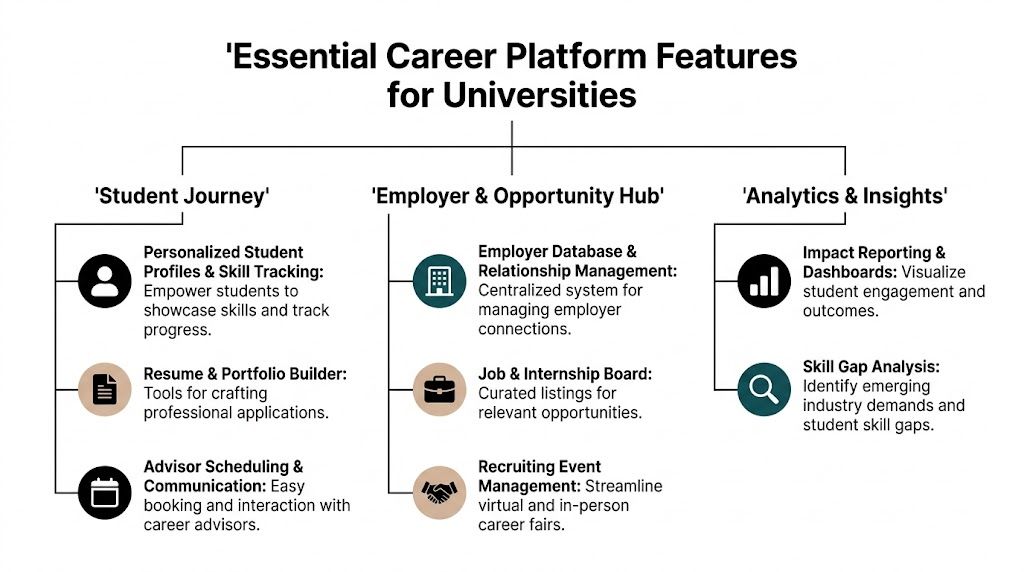
Student-facing tools that remove avoidable friction
Students will not follow a complicated process just because the institution bought good software. The platform should feel as practical as online banking. Sign in once, see what matters now, complete the next step, and come back later without losing progress.
Look for features that support that behavior:
- Profile-based personalization: Recommendations should reflect program, class year, interests, skills, and prior activity.
- Clear next-step design: Students should know whether to book an appointment, attend an event, revise a resume, or apply.
- Advisor scheduling and messaging: Help should sit inside the workflow rather than in a separate inbox.
- Event participation tied to follow-up actions: A workshop or employer session should lead naturally to preparation or application tasks.
- Saved progress: Students should be able to pause and return without rebuilding profiles or re-entering information.
A simple demo test works well here. Ask the vendor to show the platform through the eyes of a first-year exploring options, then through the eyes of a senior applying this week. If the experience barely changes, the platform is probably organizing content, not guiding students.
Matching and recommendations students can actually use
Recommendation engines can save time. They can also create confusion if they feel like a black box.
A committee should ask practical questions, not just technical ones:
- What information shapes a recommendation?
- Can a student see why a role, employer, or resource appears?
- Can an advisor review the logic and correct weak matches?
- What happens when a student profile is incomplete or outdated?
Good matching should work like a skilled advisor who says, “This fits your major, your internship history, and the skills you marked last month.” Students do not need a lecture on machine learning. They need a recommendation they understand well enough to act on.
Committee note: A match score has value only if it leads to a better decision or a faster next step.
Tooltip terms
- ATS: Applicant Tracking System. The software many employers use to screen and sort applications.
- LMS: Learning Management System. Systems such as Canvas or Moodle where courses and learning activity live.
- SIS: Student Information System. The institutional source for enrollment, student identity, and academic records.
Resume, cover letter, and application support
This is the feature area committees should examine most closely.
Many university career platforms do a respectable job with discovery. Fewer do enough once the student is ready to apply. That gap matters because employment outcomes improve when students can move from “I found an opportunity” to “I submitted a customized application” without switching between five tools.
The platform should support work, not just information. That means evaluating whether it includes:
- built-in resume editing
- ATS-aware resume feedback
- cover letter drafting or guided prompts
- job-specific tailoring support
- application tracking
- reminders for deadlines and follow-up
- job fit analysis tied to the role description
A helpful comparison is this: exploration features are the campus map. Application tools are the vehicle. Universities need both. A student who knows where to go but cannot prepare documents, tailor materials, and track submissions is still stuck.
For institutions exploring branded application-support capabilities, a white-label AI resume builder for university career platforms shows what that execution layer can look like inside a campus experience.
Students also benefit from seeing different hiring models and job formats. For example, those considering distributed work can use curated places to Encuentra trabajos remotos and compare expectations, communication styles, and application requirements.
Analytics that answer operational questions
Career teams need more than a count of logins or event registrations. They need reporting that helps them decide where students are progressing and where they are getting stuck.
Useful dashboards should answer questions such as:
- Which student groups move from exploration into application activity?
- Which workshops or fairs lead to advising appointments or document updates?
- Where do students abandon the process?
- Which employers continue to recruit across terms?
- Which interventions appear before positive outcomes?
That last point is often missed. If the platform only measures attention, the university learns who clicked. If it measures progression, the university learns what helped.
Integration and workflow fit
A career platform becomes harder to use when it sits apart from the rest of the campus technology stack. Students end up re-entering information. Staff end up checking multiple systems. Reports break because records do not match.
Research on integrating SaaS products in higher education enterprise architecture found that interoperability through OAuth 2.0, SAML 2.0, and RESTful APIs can reduce vendor lock-in risks by up to 40%.
In plain language, clean integration usually leads to:
- easier sign-on for students and staff
- fewer duplicate profiles
- more reliable data exchange with SIS and LMS platforms
- less manual administrative work
- stronger long-term flexibility if campus systems change
Questions for IT and procurement
| Pregunta | Why it matters |
|---|---|
| Does it support SSO through OAuth 2.0 or SAML 2.0? | Reduces login friction and support tickets |
| Are there documented REST APIs? | Makes integrations easier to maintain |
| Can it exchange data with SIS and LMS platforms? | Prevents duplicate records and siloed workflows |
| How portable is our data if we leave? | Protects institutional flexibility |
| What accessibility standards are supported? | Ensures equitable student access |
Privacy, accessibility, and governance
These features rarely win the demo. They often decide whether the purchase succeeds.
A university platform handles student identity, advising records, employer activity, and sometimes application materials. That means the system should include clear privacy controls, role-based permissions, accessible design, and reliable audit logs. Advisors, employer relations staff, faculty, and administrators should each see the right information for their role.
The committee should treat these features as part of service quality, not legal fine print. If a student cannot use the platform easily, if staff cannot trust who changed a record, or if data permissions are unclear, the platform creates work instead of reducing it.
The strongest career platforms do one thing very well. They turn scattered career services into a connected student journey that ends in action, not just awareness.
Measuring Real-World Impact and ROI
A committee usually asks the same question after the demo: “How will we know this was worth it?”
That's the right question. Features matter only if they change behavior, reduce friction, or improve outcomes.
One useful benchmark comes from Modern Campus’s review of career pathways software trends, which cites uConnect’s 90% average positive outcome rate, 5% higher year-over-year than the NACE national benchmark. That doesn't mean every university will replicate the same result. It does show that measurable impact is possible when the platform becomes part of the student experience rather than a side tool.
ROI starts with the right scorecard
Don't measure success only by logins. Logins can be high even when students aren't getting meaningful help.
A better scorecard mixes operational, engagement, and outcome measures.
Operational indicators
- Staff workflow efficiency: Are advisors spending less time on manual coordination?
- Reporting readiness: Can the office pull leadership updates without rebuilding spreadsheets?
- Employer management quality: Is employer outreach more organized and less dependent on individual inboxes?
Student engagement indicators
- Appointment follow-through: Are students moving from discovery into action?
- Event-to-next-step behavior: Do workshops and fairs lead to profile completion, advising, or applications?
- Repeat usage: Do students come back because the platform remains useful after the first visit?
Outcome indicators
- Internship participation
- Application volume and completion
- Internship-to-full-time conversion
- First-destination outcomes
- Alumni outcome visibility
The strongest ROI story combines better student outcomes with lower administrative drag.
A practical before-and-after lens
Instead of asking whether the software is “valuable,” compare the institution's current and future operating state.
| Área | Before platform consolidation | After platform consolidation |
|---|---|---|
| Student journey | Multiple systems and unclear next steps | More unified path from exploration to action |
| Staff workload | Manual exports, email follow-up, spreadsheet reporting | More centralized processes and cleaner visibility |
| Employer engagement | Dispersed contacts and inconsistent workflows | More structured interactions |
| Leadership reporting | Time-consuming assembly of evidence | Faster access to reportable activity and outcomes |
Build the business case around avoided waste
Committees often focus on the subscription cost and undercount the cost of fragmentation. That hidden cost shows up in duplicated systems, staff workarounds, incomplete data, uneven student support, and weak reporting confidence.
A stronger business case usually includes:
- Time recovered by staff
- Improved student access to services
- More consistent employer engagement
- Better evidence for institutional decision-making
If you need examples of how institutions frame platform impact for stakeholders, these Estudios de caso de plataformas profesionales can help you shape the internal conversation.
The ROI question most teams miss
The most important ROI question isn't “Did students use the platform?” It is “Did the platform help more students move from interest to application to outcome?”
That question becomes even more important when you evaluate whether your platform includes execution tools or leaves students to finish the hardest part elsewhere.
Your Step-by-Step Implementation Roadmap
A career platform rollout succeeds when the university treats it as a change project, not just a software install.
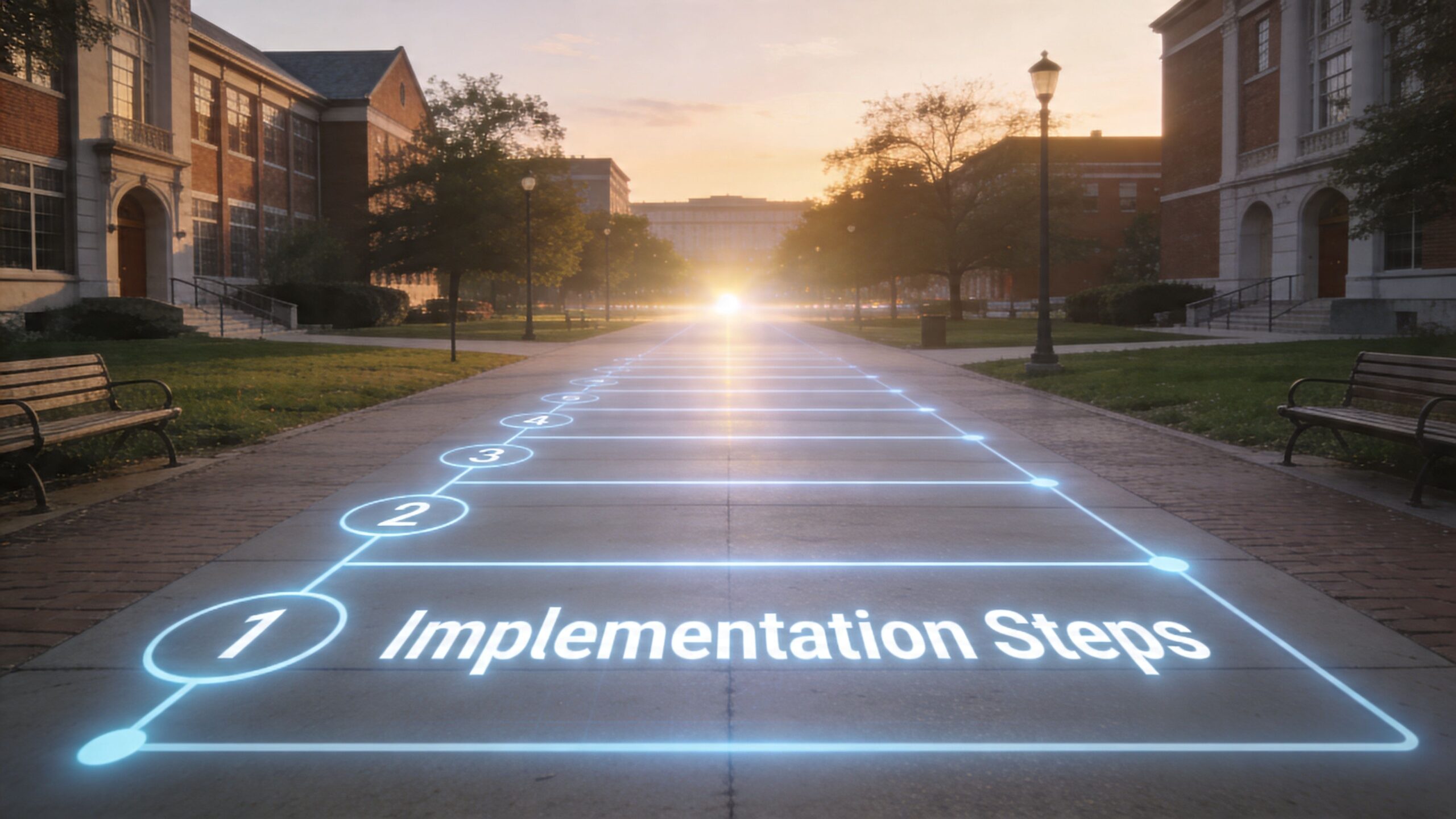
Step 1 and Step 2 align the campus and define the scope
Start with the people who will shape adoption. That usually includes career services, IT, student affairs, institutional research, accessibility, and employer engagement staff. In some institutions, academic advising or experiential learning teams should be included from the start.
Then define what the first phase includes. Many projects stumble because the launch scope is too broad. A better opening phase often focuses on core workflows such as student access, employer posting, advising, and baseline reporting.
Early planning checklist
- Name an executive sponsor: Someone needs authority to resolve tradeoffs.
- Choose a project lead: Day-to-day coordination can't be a side task.
- Map current workflows: Document how students, staff, and employers move today.
- Identify system dependencies: Note every SIS, LMS, CRM, SSO, and reporting touchpoint.
A platform launches more smoothly when the institution agrees on process changes before configuration starts.
Step 3 and Step 4 handle data and configuration
The next phase is practical. Which data will come over first. What fields matter. Which permissions differ by role. Which historical records are essential at launch, and which can wait.
This is also where the university should decide how much complexity students need to see on day one. Most campuses benefit from a simpler first experience. Add depth later.
If you're planning a branded rollout with embedded AI job-search tools, this guide on Cómo lanzar una plataforma universitaria de IA para la búsqueda de empleo en 7 pasos provides a useful planning model.
Step 5 train staff before you market to students
Staff confidence shapes adoption more than launch emails do. If advisors, employer-relations teams, and front-desk staff don't know how the platform fits their work, students will sense the uncertainty immediately.
Training should cover:
- standard staff workflows
- escalation paths for support issues
- common student questions
- employer-facing processes
- reporting basics for managers
A short video can also help project teams align on rollout expectations and common implementation tasks.
Step 6 and Step 7 launch in waves and monitor behavior
Don't rely on one campus-wide announcement. Segment the launch.
Por ejemplo:
- graduating students may need application tools first
- first-year students may need exploration prompts
- faculty may need referral guidance
- employers may need a separate onboarding path
First-month launch actions
| Audience | Best first message |
|---|---|
| Students | What they can do today in one place |
| Advisors | How the system supports appointments and follow-up |
| Employers | How to post roles and engage campus talent |
| Liderazgo | What will be measured in the first term |
Watch real behavior after launch. Where do students abandon the process. Which features go unused. Which staff teams create workarounds. Those signals are more valuable than launch-day enthusiasm.
Implementation isn't complete when the system is live. It's complete when the campus changes how it works.
Choosing the Right Career Platform Partner
A committee can sit through three polished demos and still miss the central question. Which partner can help your university carry a student from early curiosity to an actual submitted application, with less staff friction along the way?
That question changes the evaluation process.
Many platforms are good at helping students explore options, attend events, or browse jobs. Fewer help students do the hard follow-through work once they choose a direction. If your institution wants stronger employment outcomes, the partner matters as much as the platform. You are not only buying software. You are choosing a system your staff will rely on during advising, employer engagement, reporting, and the final stretch where students need to produce resumes, tailor materials, and keep applications moving.
Start with institutional fit
Brand recognition can make a room feel comfortable. It does not tell you whether the product fits your advising model, your data rules, or your students' habits.
A better test is simple. Ask whether the platform fits your campus like a well-designed building fits daily traffic. Students should know where to go next. Staff should not need workarounds to complete routine tasks. IT should be able to connect core systems without creating a maintenance problem. The product team should explain how the system works in plain language, especially around matching logic, permissions, integrations, and future updates.
For some institutions, a white-label career platform for universities is worth considering because it gives the campus a branded experience while keeping the underlying product model consistent.
Use a scorecard so the room does not rely on impressions
Demos are designed to look polished. Committees need a way to slow the conversation down and compare vendors on the work that happens after launch.
Vendor Evaluation Scorecard
| Evaluation Criterion | Weight (1-5) | Vendor A Score (1-10) | Vendor B Score (1-10) | Notes |
|---|---|---|---|---|
| Student user experience | 5 | |||
| Career staff workflow fit | 5 | |||
| Employer portal quality | 4 | |||
| Integration with SIS and LMS | 5 | |||
| Analytics and reporting | 4 | |||
| Resume and application support | 5 | |||
| Accessibility and privacy controls | 5 | |||
| Implementation support | 4 | |||
| Roadmap transparency | 3 | |||
| Pricing clarity | 4 |
The weighting matters. If your current gap is not awareness but execution, then resume support, application tracking, and advisor follow-up should carry more weight than a vendor's event calendar polish.
That distinction is easy to miss.
A student who has already chosen a target role does not need another inspirational dashboard. That student needs tools that help convert intent into action. The same principle applies to content support. Resources such as personal brand statements for students are useful because they help students articulate value in language they can use in resumes, profiles, and applications. Your platform partner should make that kind of execution support easier to deliver, not leave it scattered across disconnected tools.
Questions worth asking in the demo
Ask the vendor to show the whole student journey in one flow. Exploration, advising, opportunity discovery, document preparation, application activity, and follow-up should connect logically. If the demo stops at job discovery, the committee should treat that as a real limitation, not a minor gap.
Product questions
- Show the student journey end to end. How does a student move from exploration to advising to resume work to application activity?
- Explain the recommendation logic. Why was a role suggested, and what can a student or advisor do with that information?
- Demonstrate a dean-level report. Show a report tied to engagement, outcomes, or service demand, not just clicks.
- Show execution tools in context. Can students build, revise, save, and track application materials without leaving the ecosystem?
Technical questions
- How does SSO work in practice
- What data can we export
- How are permissions managed across staff roles
- What happens if we need to change integrations later
Partnership questions
- Who supports us after go-live
- How are product requests handled
- What does the roadmap suggest about post-exploration student needs
- How often do clients meet the product team
Good partners answer these questions clearly and without hiding behind jargon.
Test the partnership, not just the product
Universities rarely struggle because a platform lacks one more feature. They struggle when the vendor cannot support policy review, stakeholder alignment, accessibility review, data governance, and long-term adoption.
That is why references matter. Ask current clients what happened six months after launch. Did staff still use the system as intended? Did students return to it after first login? Did the vendor help the institution improve workflows, or did the campus end up patching gaps with extra spreadsheets, email reminders, and separate document tools?
You are choosing a partner for a multi-year process. A good one helps the university reduce friction across the full journey, especially the part where student momentum usually drops. That is where employment outcomes are won or lost.
Build buy-in around role-specific value
Final approval often stalls for political reasons, not technical ones. Each stakeholder group needs a practical answer tied to its own work.
- IT wants to know how much upkeep the system creates
- procurement wants contract clarity and vendor reliability
- accessibility leaders want evidence, not promises
- faculty want to know whether students will use it
- career staff want proof that it saves time instead of adding another layer of tasks
The committee should frame the recommendation in operational terms. How does this partner improve advising follow-up, employer engagement, reporting quality, and student application activity? How does it reduce handoffs between disconnected tools? How does it help students finish what they start?
Those are the questions that lead to a sound decision.
Beyond Exploration The Future of Student Career Success
Many universities have improved career exploration. Students can browse pathways, attend events, connect with alumni, and receive curated opportunities more easily than before.
That progress matters. But it also reveals the next gap.

De acuerdo a Steppingblocks’ career services discussion, one underserved angle in this market is the lack of integration with AI-powered job application automation tools designed for students and recent graduates. In other words, many platforms help students discover opportunities but stop short of post-graduation application execution.
That gap is bigger than it sounds.
Where exploration stops and friction begins
A student may know which role to pursue and still lose momentum because they need to:
- tailor a resume
- write a cover letter
- track multiple deadlines
- prepare for interviews
- keep versions of documents organized
Career centers see this every term. Students aren't always blocked by lack of ambition. They're often blocked by the mechanics of applying well, repeatedly, under time pressure.
The next-generation model
The future of career platform saas for universities is not just better recommendation engines. It is a more complete system that connects:
| Escenario | What students need |
|---|---|
| Explorar | Pathways, interests, labor insights, alumni examples |
| Prepare | Advising, events, skills reflection, profile building |
| Execute | Resume tailoring, cover letters, application tracking, interview prep |
| Learn | Feedback loops for staff and institutional reporting |
That execution layer is where many institutions still rely on disconnected tools, generic templates, or student self-management.
For students who need help articulating value before they apply, resources on personal brand statements for students can be a useful bridge between self-knowledge and application materials.
Why this matters for equity
Students with family networks or prior internship experience often learn application mechanics outside the institution. Others don't. When a university offers only exploration tools, it may unintentionally help the most prepared students most.
Execution support changes that. It gives first-generation students, career changers, and less confident applicants a more practical runway from opportunity discovery to submitted application.
Career access isn't complete when students can see opportunities. It's stronger when they can compete for them.
What committees should do now
Ask one direct question during planning and vendor review: Where does our student experience end?
If the answer is “at exploration,” the institution has more work to do.
A more complete ecosystem should help students:
- understand where they fit
- present themselves clearly
- apply with less friction
- stay organized through the process
- prepare for the next conversation after submission
Universities that build that full pathway won't just modernize career services. They'll make career support more usable, more equitable, and more measurable.
If your institution is thinking beyond exploration and wants to add practical application tools such as ATS-friendly resume tailoring, cover letter generation, job match analysis, interview prep, and tracking, JobWinner is one option to evaluate as part of a broader university career platform strategy.